# GLM4V 最佳实践
## 目录
- [环境准备](#环境准备)
- [推理](#推理)
- [微调](#微调)
- [微调后推理](#微调后推理)
## 环境准备
```shell
# 请使用"ms-swift>=2.2"或者main分支
git clone https://github.com/modelscope/swift.git
cd swift
pip install -e '.[llm]'
```
模型链接:
- glm4v-9b-chat: [https://modelscope.cn/models/ZhipuAI/glm-4v-9b/summary](https://modelscope.cn/models/ZhipuAI/glm-4v-9b/summary)
## 推理
推理glm4v-9b-chat:
```shell
# Experimental environment: A100
# 30GB GPU memory
CUDA_VISIBLE_DEVICES=0 swift infer --model_type glm4v-9b-chat
```
输出: (支持传入本地路径或URL)
```python
"""
<<< 你好
Input a media path or URL <<<
你好👋!很高兴见到你,欢迎问我任何问题。
--------------------------------------------------
<<< clear
<<< 描述这张图片
Input a media path or URL <<< http://modelscope-open.oss-cn-hangzhou.aliyuncs.com/images/cat.png
这是一张特写照片,展示了一只毛茸茸的小猫。小猫的眼睛大而圆,呈深蓝色,眼珠呈金黄色,非常明亮。它的鼻子短而小巧,是粉色的。小猫的嘴巴紧闭,胡须细长。它的耳朵竖立着,耳朵内侧是白色的,外侧是棕色的。小猫的毛发看起来柔软而浓密,主要是白色和棕色相间的条纹图案。背景模糊不清,但似乎是一个室内环境。
--------------------------------------------------
<<< clear
<<< 图中有几只羊
Input a media path or URL <<< http://modelscope-open.oss-cn-hangzhou.aliyuncs.com/images/animal.png
图中共有四只羊。其中最左边的羊身体较小,后边三只羊体型逐渐变大,且最右边的两只羊体型大小一致。
--------------------------------------------------
<<< clear
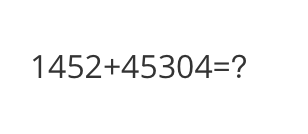
<<< 计算结果是多少?
Input a media path or URL <<< http://modelscope-open.oss-cn-hangzhou.aliyuncs.com/images/math.png
1452+45304=46756
--------------------------------------------------
<<< clear
<<< 根据图片中的内容写首诗
Input a media path or URL <<< http://modelscope-open.oss-cn-hangzhou.aliyuncs.com/images/poem.png
湖光山色映小船,
星辉点点伴旅程。
人在画中寻诗意,
心随景迁忘忧愁。
--------------------------------------------------
<<< clear
<<< 对图片进行OCR
Input a media path or URL <<< https://modelscope-open.oss-cn-hangzhou.aliyuncs.com/images/ocr.png
图片中的OCR结果如下:
简介
SWIFT支持250+LLM和35+MLLM(多模态大模型)的训练、推理、评测和部署。开发者可以直接将我们的框架应用到自己的Research和生产环境中,实现模型训练评测到应用的完整链路。我们除支持了PEFT提供的轻量训练方案外,也提供了一个完整的Adapters库以支持最新的训练技术,如NEFTune、LoRA+、LLaMA-PRO等,这个适配器库可以脱离训练脚本直接使用在自己的自定流程中。
为方便不熟悉深度学习的用户使用,我们提供了一个Gradio的web-ui用于控制训练和推理,并提供了配套的深度学习课程和最佳实践供新入门。
此外,我们也在拓展其他模态的能力,目前我们支持了AnimateDiff的全参数训练和LoRA训练。
SWIFT具有丰富的文档体系,如有使用问题请请查看这里。
可以在Huggingface space和ModelScope创空间中体验SWIFT web-ui功能了。
"""
```
示例图片如下:
cat:
 animal:
 math:
math:
 poem:
poem:
 ocr:
ocr:
 **单样本推理**
```python
import os
os.environ['CUDA_VISIBLE_DEVICES'] = '0'
from swift.llm import (
get_model_tokenizer, get_template, inference, ModelType,
get_default_template_type, inference_stream
)
from swift.utils import seed_everything
import torch
model_type = ModelType.glm4v_9b_chat
template_type = get_default_template_type(model_type)
print(f'template_type: {template_type}')
model, tokenizer = get_model_tokenizer(model_type, torch.float16,
model_kwargs={'device_map': 'auto'})
model.generation_config.max_new_tokens = 256
template = get_template(template_type, tokenizer)
seed_everything(42)
images = ['http://modelscope-open.oss-cn-hangzhou.aliyuncs.com/images/road.png']
query = '距离各城市多远?'
response, history = inference(model, template, query, images=images)
print(f'query: {query}')
print(f'response: {response}')
# 流式
query = '距离最远的城市是哪?'
images = images
gen = inference_stream(model, template, query, history, images=images)
print_idx = 0
print(f'query: {query}\nresponse: ', end='')
for response, _ in gen:
delta = response[print_idx:]
print(delta, end='', flush=True)
print_idx = len(response)
print()
"""
query: 距离各城市多远?
response: 距离马踏还有14Km,距离阳江还有62Km,距离广州还有293Km。
query: 距离最远的城市是哪?
response: 距离最远的城市是广州,有293Km。
"""
```
示例图片如下:
road:
**单样本推理**
```python
import os
os.environ['CUDA_VISIBLE_DEVICES'] = '0'
from swift.llm import (
get_model_tokenizer, get_template, inference, ModelType,
get_default_template_type, inference_stream
)
from swift.utils import seed_everything
import torch
model_type = ModelType.glm4v_9b_chat
template_type = get_default_template_type(model_type)
print(f'template_type: {template_type}')
model, tokenizer = get_model_tokenizer(model_type, torch.float16,
model_kwargs={'device_map': 'auto'})
model.generation_config.max_new_tokens = 256
template = get_template(template_type, tokenizer)
seed_everything(42)
images = ['http://modelscope-open.oss-cn-hangzhou.aliyuncs.com/images/road.png']
query = '距离各城市多远?'
response, history = inference(model, template, query, images=images)
print(f'query: {query}')
print(f'response: {response}')
# 流式
query = '距离最远的城市是哪?'
images = images
gen = inference_stream(model, template, query, history, images=images)
print_idx = 0
print(f'query: {query}\nresponse: ', end='')
for response, _ in gen:
delta = response[print_idx:]
print(delta, end='', flush=True)
print_idx = len(response)
print()
"""
query: 距离各城市多远?
response: 距离马踏还有14Km,距离阳江还有62Km,距离广州还有293Km。
query: 距离最远的城市是哪?
response: 距离最远的城市是广州,有293Km。
"""
```
示例图片如下:
road:
 ## 微调
多模态大模型微调通常使用**自定义数据集**进行微调. 这里展示可直接运行的demo:
```shell
# Experimental environment: A100
# 40GB GPU memory
CUDA_VISIBLE_DEVICES=0 swift sft \
--model_type glm4v-9b-chat \
--dataset coco-en-2-mini \
--batch_size 2
# DDP
NPROC_PER_NODE=2 \
CUDA_VISIBLE_DEVICES=0,1 swift sft \
--model_type glm4v-9b-chat \
--dataset coco-en-2-mini \
--ddp_find_unused_parameters true
```
[自定义数据集](../Instruction/自定义与拓展.md#-推荐命令行参数的形式)支持json, jsonl样式, 以下是自定义数据集的例子:
(支持多轮对话, 但总的轮次对话只能包含一张图片, 支持传入本地路径或URL)
```jsonl
{"query": "55555", "response": "66666", "images": ["image_path"]}
{"query": "eeeee", "response": "fffff", "history": [], "images": ["image_path"]}
{"query": "EEEEE", "response": "FFFFF", "history": [["query1", "response1"], ["query2", "response2"]], "images": ["image_path"]}
```
## 微调后推理
直接推理:
```shell
CUDA_VISIBLE_DEVICES=0 swift infer \
--ckpt_dir output/glm4v-9b-chat/vx-xxx/checkpoint-xxx \
--load_dataset_config true
```
**merge-lora**并推理:
```shell
CUDA_VISIBLE_DEVICES=0 swift export \
--ckpt_dir output/glm4v-9b-chat/vx-xxx/checkpoint-xxx \
--merge_lora true
CUDA_VISIBLE_DEVICES=0 swift infer \
--ckpt_dir output/glm4v-9b-chat/vx-xxx/checkpoint-xxx-merged \
--load_dataset_config true
```
## 微调
多模态大模型微调通常使用**自定义数据集**进行微调. 这里展示可直接运行的demo:
```shell
# Experimental environment: A100
# 40GB GPU memory
CUDA_VISIBLE_DEVICES=0 swift sft \
--model_type glm4v-9b-chat \
--dataset coco-en-2-mini \
--batch_size 2
# DDP
NPROC_PER_NODE=2 \
CUDA_VISIBLE_DEVICES=0,1 swift sft \
--model_type glm4v-9b-chat \
--dataset coco-en-2-mini \
--ddp_find_unused_parameters true
```
[自定义数据集](../Instruction/自定义与拓展.md#-推荐命令行参数的形式)支持json, jsonl样式, 以下是自定义数据集的例子:
(支持多轮对话, 但总的轮次对话只能包含一张图片, 支持传入本地路径或URL)
```jsonl
{"query": "55555", "response": "66666", "images": ["image_path"]}
{"query": "eeeee", "response": "fffff", "history": [], "images": ["image_path"]}
{"query": "EEEEE", "response": "FFFFF", "history": [["query1", "response1"], ["query2", "response2"]], "images": ["image_path"]}
```
## 微调后推理
直接推理:
```shell
CUDA_VISIBLE_DEVICES=0 swift infer \
--ckpt_dir output/glm4v-9b-chat/vx-xxx/checkpoint-xxx \
--load_dataset_config true
```
**merge-lora**并推理:
```shell
CUDA_VISIBLE_DEVICES=0 swift export \
--ckpt_dir output/glm4v-9b-chat/vx-xxx/checkpoint-xxx \
--merge_lora true
CUDA_VISIBLE_DEVICES=0 swift infer \
--ckpt_dir output/glm4v-9b-chat/vx-xxx/checkpoint-xxx-merged \
--load_dataset_config true
```